
The Wallke X3 Pro is equipped with a sophisticated color digital display. If you made a few adjustments and can’t remember the default settings, the instructions below will guide you on how to change your display advanced settings.
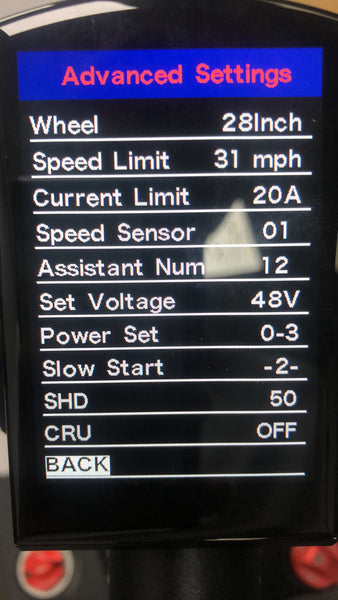
Wheel
This sets the size of the wheel for the purpose of calculating speed from wheel rotations. With the 4” fat tire, the 26” wheel behaves like a 28” wheel on this bike.
Speed Limit
This sets the upper limit of speed where power assist will be provided. Set this to comply with local regulations.
Current Limit
This controls the automatic protection circuit in the controller so your battery and motor are protected. Changing this from the factory setting won’t improve performance, but it may disable important protections and lead to costly repairs.
Speed Sensor
Factory set to let the controller know what type of speed sensor is used. Changing this may cause the controller to malfunction.
Assistant Num
This sets the force provided by the power assist. The value ranges from 4 (strongest assist) to 24 (lightest assist), determining how gentle the assist feels.
Set Voltage
Sets how the battery monitor translates voltage into battery percentage on the display. Altering this may make the battery display inaccurate.
If you need the default settings for the advanced settings menu, perform a factory reset. Factory Restore will reset all values on both the Display panel and the Advanced panel.
How to Reset Your Display
- Hold the up and down arrows simultaneously to enter the Display settings menu.
- Select "Factory Restore".
- Confirm "Factory Restore" by selecting "Yes".
- Select "BACK" to return to the higher menu or the main display.
- Restart the display.
Advanced Features
Lock or Unlock Your Display Control Pad
If your display will not turn off, it may be accidentally locked. Press the up and power buttons to unlock your display.
- Lock: Press the up, down, and power buttons simultaneously to lock the display.
- Unlock: Press the up and power buttons to unlock the display.
How to Turn On Cruise Control
If you have arthritis or thumb pain, you can activate cruise control to free your thumb while riding.
- Hold the up and down arrows simultaneously to enter the Advanced settings menu.
- Select "CRU".
- Set "CRU" to "ON" to activate cruise control.
The Wallke Cruise Control will automatically turn on when the bike maintains any speed for over 8 seconds without moving the handles. Cruise control is disengaged when the brake is applied.
Using the Password to Unlock the Electric System
When presented with the password challenge, set each of the 4 digits using + or - and press "i" to confirm. Entering the correct password will display the main screen and make the system ready to ride.
Remember to contact us if you have any questions regarding the display settings of your Wallke X3 Pro.




Need to see if I can get a controller for x3 max and power button, not sure what it is I checked the battery is good