
The WallkeX3 and Wallke X3 PRO is equipped with intelligent LCD display.
LCD display is located on the middle of the handlebars has many features including Password-protected, Throttle Assist Boost, and plenty of electronic feedback to name a few. The dashboard have USB ports for charging other devices, it can be a nice convenience feature if you like to use your phone for music or navigation while riding.
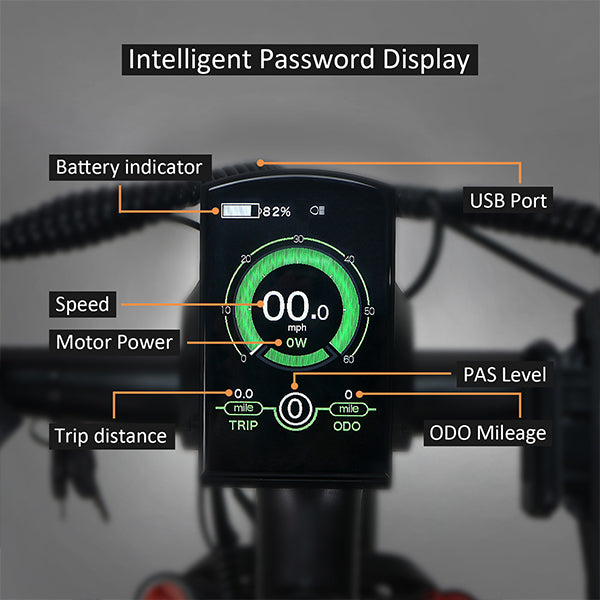
Functions:
- Battery and battery percentage indication
- Motor Power indication
- Assistance-level indication
- Speed indication (incl. running speed, Max. speed and Ave. speed)
- Odometer and trip distance
- The push-assistance function
- Trip time indication
- Backlight On/Off
- Error code indication
- Pedaling frequency indication(optional)
- USB connection indicator (optional)
- The remaining range indication(optional)
- Various Parameters Settings (e.g., wheel size, speed-limited, battery level bar, assistance level, controller limited current, password enable, etc.)
- Recover Default
General Operation:
-Switching the E-bike System On/Off
Briefly press the power button to switch on the E-bike system, and provides the power supply for the controller. To hold the power button for 2s, the E-bike system will be switched off . The E-bike system no longer use the battery power. When switching off the E-bike system the leakage current is less than 1 uA.
■When parking the E-bike for more than 10 minutes, the E-bike system switches off
automatically.
You can learn about it by clicking here.
General Settings:
-Speed-limit Settings
The default value of Wallke X3PRO is 28mpm/h. Speed Limit represents the limit speed settings. When the current speed is faster than speed limit, the E-bike system will switch off automatically. Speed limit range is 14mph/h to 28mp/h.
To change basic settings, press the “+” or the “-” button to increase or decrease until the desired value is displayed. Press the “i” button to confirm, display "OK" words prompt operation is completed. To store a changed setting and exit General Parameter Settings, hold the “i” button for 2s.
The User Manual below will show you how to perform the general setting.




Leave a comment